Where does the margin go?
In a staffing firm the contractor’s agreement sits in Google Drive, the client’s order arrives by email or through the client’s portal, hours are approved in the client’s own timesheet tool and invoices live in the accounting system. Each document is correct on its own. Nobody checks that they agree, so rates get overwritten, contracts lapse while the order runs on, accepted hours go unbilled and margin leaks without anyone noticing.
Checking all of it properly takes a controller, a contract specialist and a VAT adviser. For hundreds of contractors, nobody can staff that. Vatli puts their checks next to the coordinator who keeps the spreadsheet today.
What Vatli checks for every contractor
- The same person, period and rate on both sides.
The contractor’s agreement and the client’s order are compared line by line. A gap says exactly why: the order says 255 PLN/h, the system says 245; the agreement ended on 14 October, the order runs to April.
- Both signatures, and how late they came.
Unsigned orders and late client signatures become tasks for the client’s account manager, one click for many.
- Hours reported, accepted and invoiced.
Hours come from the client’s timesheet export. Accepted hours that were never invoiced, and contractor invoices that differ from the agreement, are flagged with the amount.
- The margin, against the norm.
Margin per contractor, per client, role and seniority over time. Change a client rate and Vatli shows the new margin and asks whether the change is intended.
- The bank account on Poland’s VAT whitelist.
A live check against the Ministry of Finance register, with the request ID kept as evidence, before the first payment.
From a Drive folder to a fixed gap
Most firms already keep one folder per contractor, named after the person. Vatli reads that folder as it is — PDFs and scanned orders, read on Vatli’s own server with OCR — matches each folder to the right contractor and files the documents on the record. When something needs to change, the next step is drafted from the data: an annex that follows the client’s order and notice period, a request for a new purchase order, or a reminder to the account manager. The coordinator acts; the expert only reviews the exceptions.
Live in our private pilot: contract matching, reconciliation of hours, invoices and margin, reading Drive folders and scans, the VAT whitelist check and a full data export. Next: a direct Google Drive connection (today a folder or ZIP from Drive), e-signature through Autenti (simulated in the demo) and connectors for accounting systems. Demos run on fictional data.
The screens your team would use
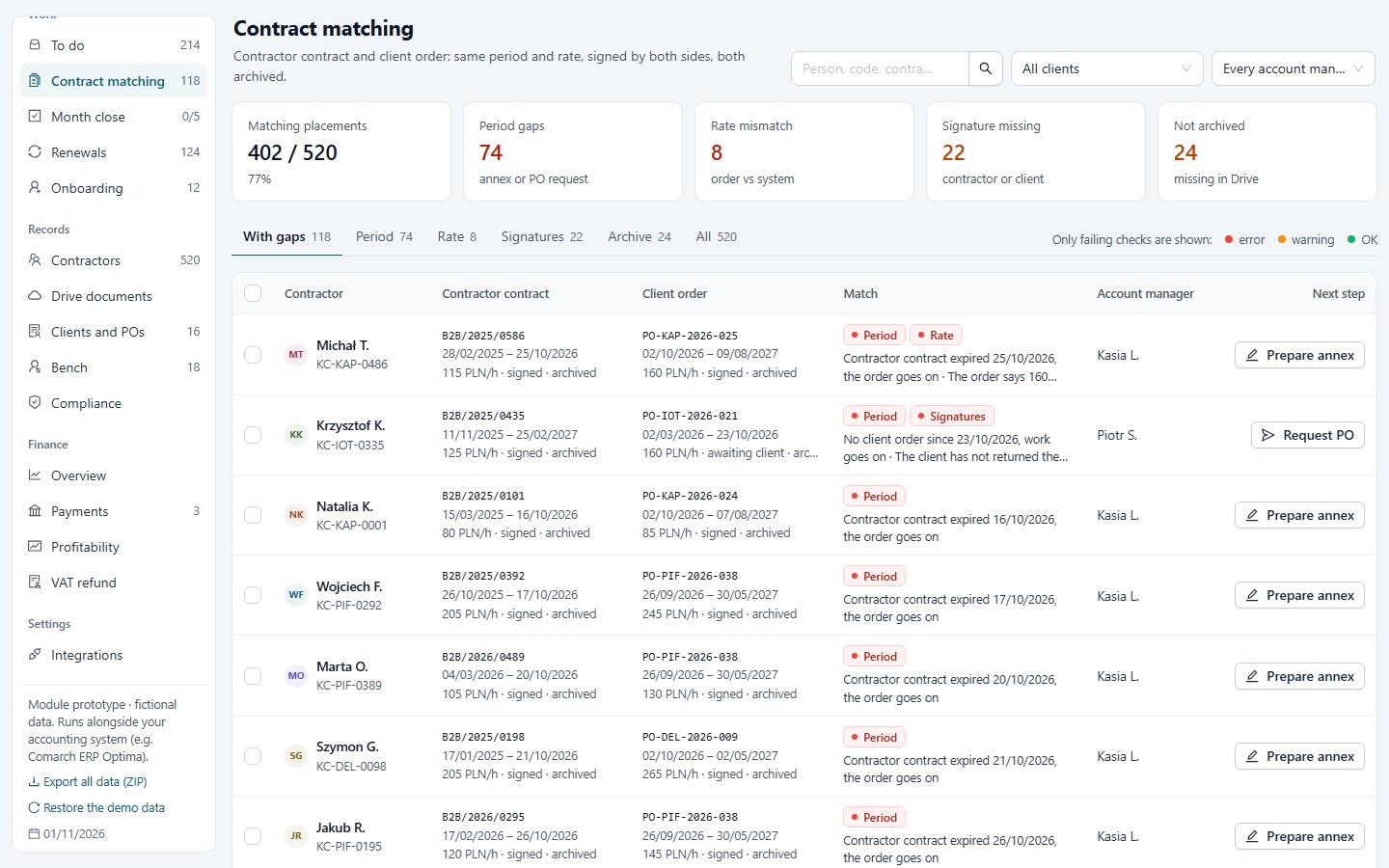
Contract matching. Both sides of every placement, each gap with its reason. 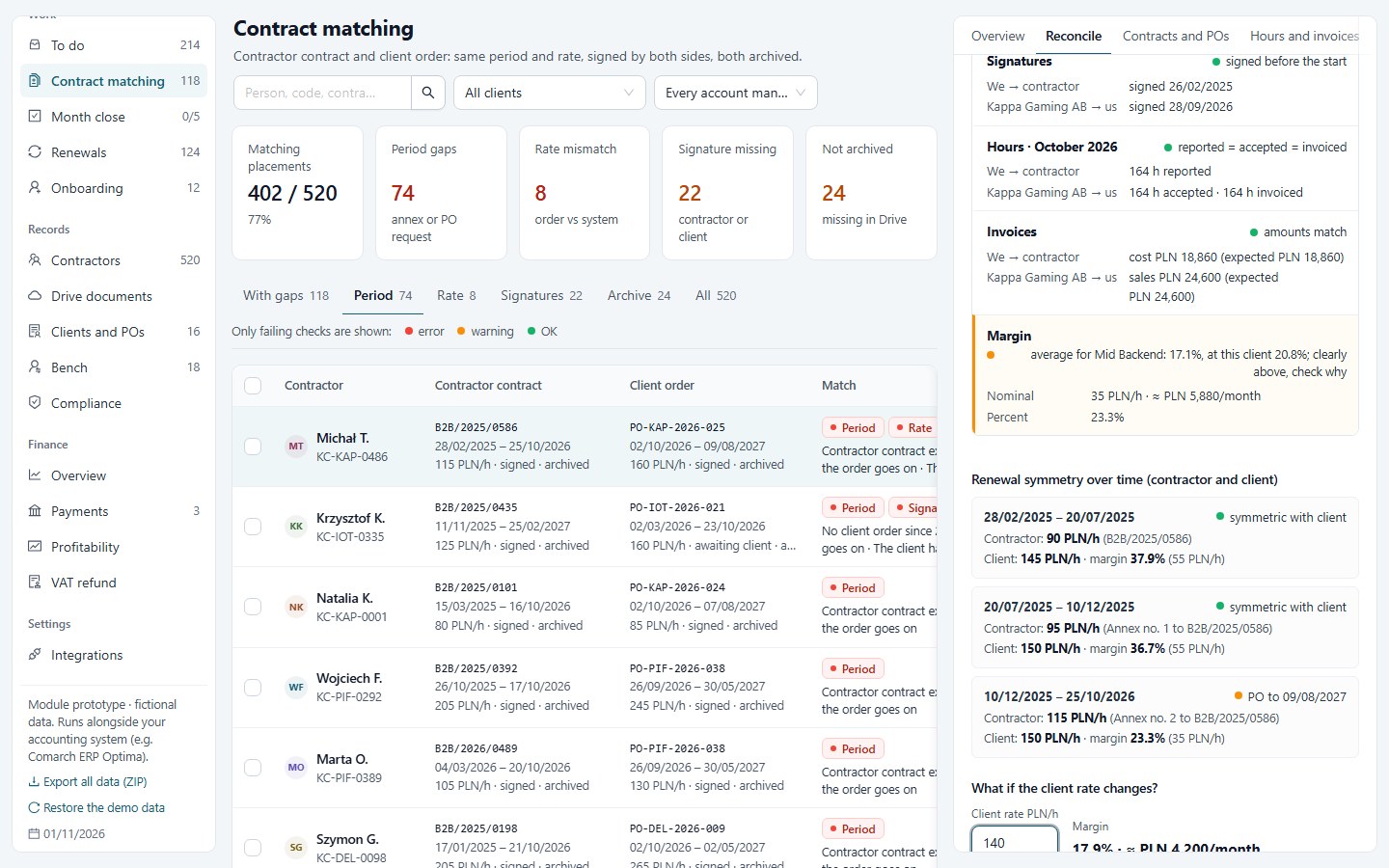
One record, both sides. Rate, term, signatures, hours, invoices and margin, with a what-if on the rate.
Built on Vatli’s VAT engine
The same engine that reads invoices and ties every VAT figure to its document runs these checks. Numbers are never guessed: a value Vatli cannot trace to a source stays empty and visible, and AI only reads documents and suggests. For staffing firms this means the next layer is already there — contractor invoices, e-invoicing in KSeF and the VAT review of the month.
See how the VAT reconciliation workflow works, or request a walkthrough with fictional data.